Quick Answer
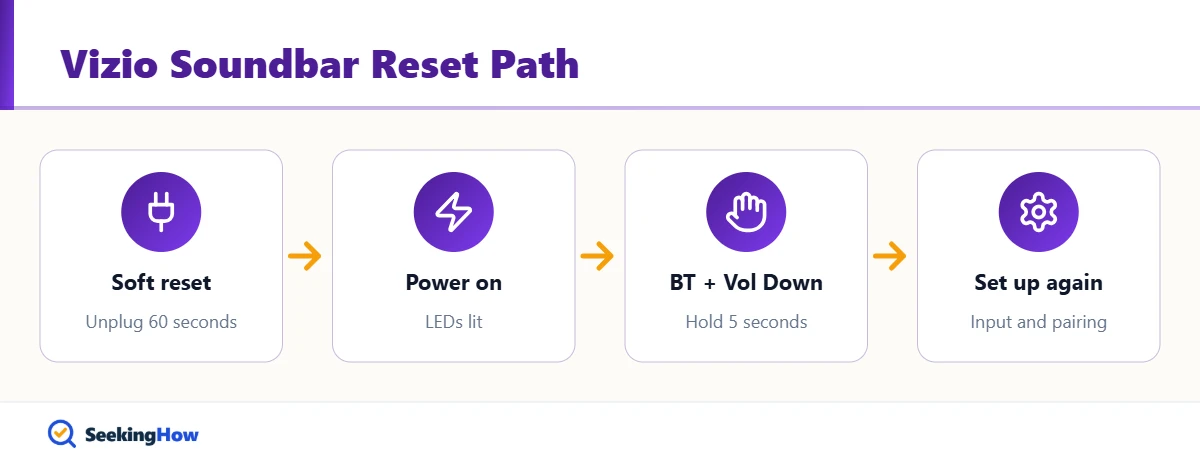
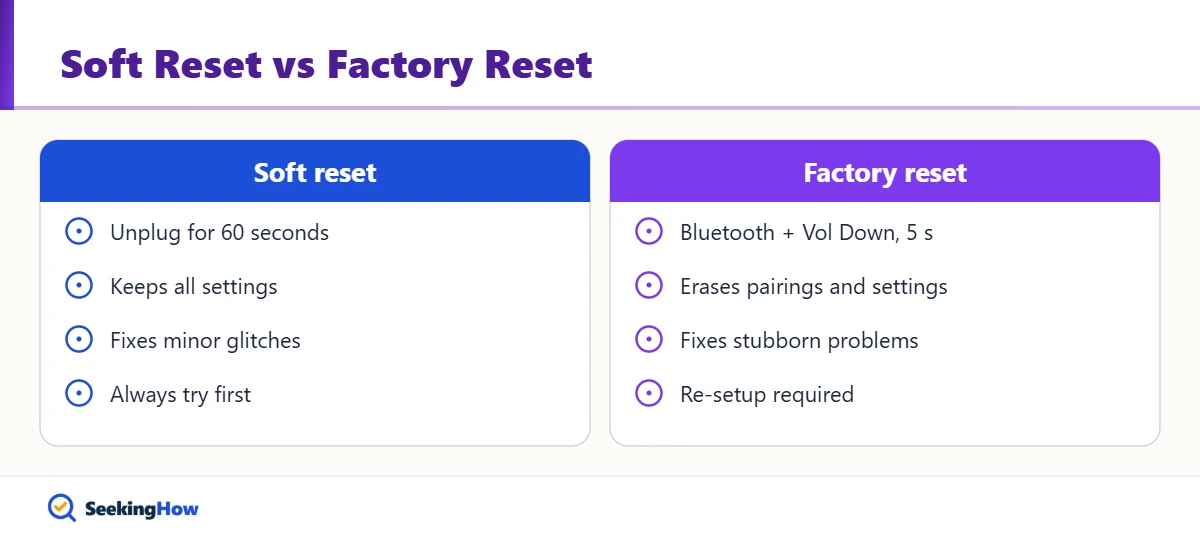
To reset a Vizio soundbar without a remote, turn the bar on, then press and hold the Bluetooth and Volume Down buttons on the soundbar together for 5 seconds until the LEDs flash, usually three times. The Vizio soundbar restarts with factory settings in about a minute. A factory reset erases pairings and settings, so try a 60-second power-cycle first.
Key Takeaways
- On most Vizio soundbars, holding Bluetooth and Volume Down for 5 seconds performs a factory reset.
- The LEDs usually flash three times to confirm the reset.
- A factory reset erases Bluetooth pairings, subwoofer settings, and preferences.
- Unplugging the bar for 60 seconds is a soft reset that fixes many glitches without erasing settings.
- A few older Vizio models reset only from the remote menu or a Vizio app, not from bar buttons.
A soundbar that will not pair, drops audio, or ignores the TV often just needs a reset. Knowing how to reset a Vizio soundbar without a remote matters because the remote is often the thing that is missing. Vizio builds the reset into the buttons on the bar for most models released over the last decade.
What You’ll Need
- Your Vizio soundbar, plugged in
- Access to the buttons on the top, side, or back of the bar
- Your phone or TV, to re-pair after the reset
- The model number from the label on the back of the bar (helpful)
How To Reset a Vizio Soundbar Without a Remote: Step-by-Step
Step 1: Try a Soft Reset First
Unplug the soundbar power cord, wait 60 seconds, and plug it back in. This clears temporary glitches without erasing anything. In practice, many no-sound and input problems disappear after this alone.
Step 2: Turn the Soundbar On
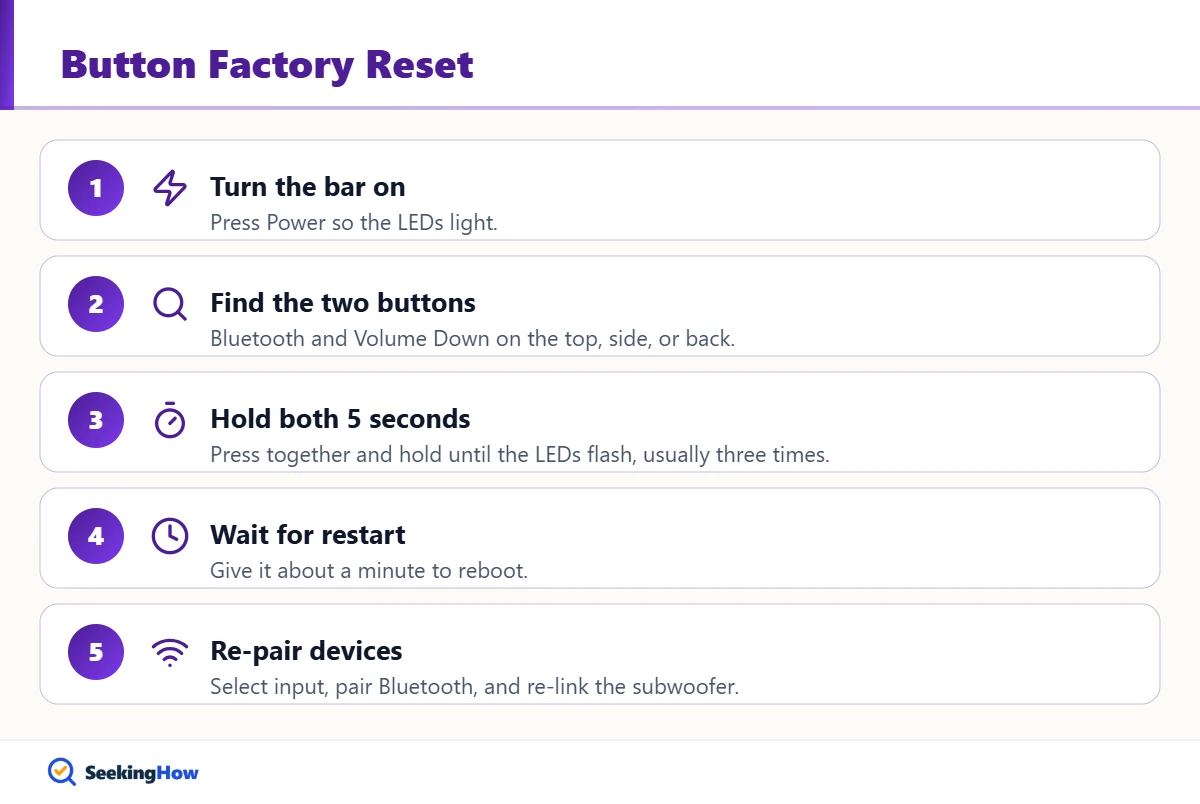
Press the Power button on the bar so the LEDs light up. The button reset works with the bar powered on. If the bar will not turn on, see our guide to turning on a Vizio soundbar without a remote.
Step 3: Find Bluetooth and Volume Down
Locate the Bluetooth button and the Volume Down (minus) button on the top, side, or back of the bar. Do not confuse Volume Down with Volume Up; Power plus Volume Up toggles Vizio TV remote control, and Power plus Volume Down toggles Eco mode on many models.
Step 4: Hold Both Buttons for 5 Seconds
Press and hold Bluetooth and Volume Down at the same time for about 5 seconds. Release when the LEDs flash, usually three times. Letting go too early is the most common reason the reset does not take.
Step 5: Let It Restart and Set Up Again
Wait about a minute for the bar to restart. Select your input with the Input button, re-pair Bluetooth devices, and re-pair a wireless subwoofer if needed. On first startup after a reset, many Vizio bars automatically search for an active input.
Bottom line: Power-cycle first; if the problem stays, hold Bluetooth and Volume Down for 5 seconds to factory reset.
If That Didn’t Work
Problem: The LEDs do not flash. Cause: The buttons were not held long enough or together. Fix: Press both at the same instant and hold a full 5 to 8 seconds.
Problem: The bar has no Bluetooth button. Cause: Some older or basic models reset only through the remote menu or an app. Fix: Use a Vizio TV remote, a universal remote, or check the model’s manual on Vizio’s site.
Problem: The subwoofer is silent after reset. Cause: The wireless pairing was cleared. Fix: Follow your model’s subwoofer pairing steps, often a button on the back of the sub.
Problem: The reset did not fix the issue. Cause: A cable, TV setting, or hardware fault. Fix: Check HDMI ARC and CEC settings on the TV, try another cable, and contact Vizio support.
| Reset type | How | Erases settings | Use when |
|---|---|---|---|
| Soft reset | Unplug 60 seconds | No | First try for any glitch |
| Button factory reset | Bluetooth + Volume Down, 5 seconds | Yes | Pairing, input, or audio problems that persist (recommended) |
| Menu or app reset | Remote menu or Vizio app | Yes | Models without button combinations |
Safety and When To Get Help
Unplug the bar by the plug, not the cord, and keep it away from liquids while you work on it. Stop and contact Vizio support if the bar smells hot, makes buzzing or popping noises at power-on, or shows no lights on a known-good outlet; those signs point to a hardware fault a reset cannot fix.
Prevention Tips
- Keep the soundbar on a surge protector.
- Install firmware updates when your model offers them.
- Set up HDMI-CEC so a lost remote never blocks basic control.
Related Guides
- How to turn on a Vizio soundbar without a remote
- How to turn on an Onn soundbar without a remote
- How to turn on a Sanyo soundbar without a remote
- LG TV says Wi-Fi is turned off: how to fix it
Sources
- Vizio SB3830-D0 Quick Start Guide: factory reset with Bluetooth and Volume Down
- Vizio Support: how to factory reset your Vizio soundbar
- Vizio: soundbar manuals and support
Frequently Asked Questions
What buttons do you hold to reset a Vizio soundbar?
On most Vizio soundbars, hold Bluetooth and Volume Down together for about 5 seconds while the bar is on. The LEDs flash, usually three times, to confirm. Button positions vary by model, so check the top, sides, and back of the bar.
Does resetting a Vizio soundbar delete Bluetooth pairings?
Yes. A factory reset clears paired phones and tablets, saved settings, and on some models the wireless subwoofer link. After the reset, put the bar in Bluetooth mode and pair your devices again. A 60-second unplug, by contrast, keeps everything.
How do I know my Vizio soundbar reset worked?
The LEDs flash several times, usually three, and the bar restarts. On many models, the bar then searches automatically for an active input. If the lights never flash, hold the buttons again, pressing both at the same moment.
Why will my Vizio soundbar not reset?
The most common causes are releasing the buttons too soon, pressing Volume Up instead of Volume Down, or a model that only resets through the remote menu or an app. Unplug the bar for 60 seconds, then retry the combination for a full 5 to 8 seconds.
Does a Vizio soundbar have a reset pinhole?
Most Vizio soundbars do not have a pinhole reset button. They use the Bluetooth plus Volume Down button combination instead, or a menu reset on a few older models. Check your model quick start guide on Vizio site if you do not see the usual buttons.
Should I reset my Vizio soundbar if there is no sound?
Not first. Check the input, the TV audio output setting, and the cable, then unplug the bar for 60 seconds. A factory reset is worth trying only if those steps fail, because it erases your settings and pairings.